Joe Young
Members
-
Joined
-
Last visited
-
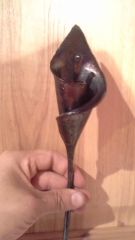 My saltfork swage block arrived yesterday so I decided to try a lily. The half rounds worked great for rolling it up! Made out of 1/8th inch plate. Took a while cutting templates out of paper plates to get it how I wanted it before forging.
© Smokey Bay Forge
-
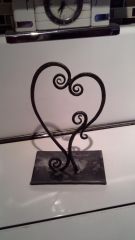 Tablet stand I made for my wife. She loves it.
© Joseph Young, Smokey Bay Forge
-
-
 It bends down 90 degrees with 2 punched and countersunk holes. Finished with beeswax.
 -
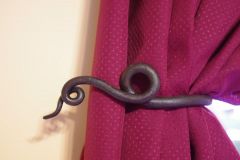
This is one of 4 curtain hold backs I made for my Wife. Worth at least a few points! ;)
© Youngs Forge, Homer AK
-
Frosty, I have used this trick at work to heat exterior equipment panels (Cold sensitive monitoring equipment) that I don't want to get too hot. I use a 6" by 10" 1/8" steel plate to dispers the heat from a magnetic block heater, that way I don't get too much heat in one spot. Im thinking mabye the plate and 2 block heaters turned on a few hours before I light the forge. Perhaps the plate isn't needed. Francis, I was absolutly disgusted with the rivet by second swing! Oh well, live and learn.
-
-