
bgott
Members
-
Joined
-
Last visited
-
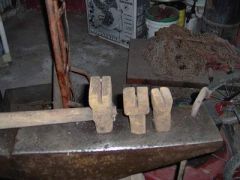 I found these in a lot of blacksmith tools I bought, anybody have any idea what they are for?
 -
I appreciate the responses. The guy I bought the tools from told me that his grandfather, whom had owned the tools, had retired from Brown and Root back in the '70s. Brown and Root is a major construction company with many divisions so there is no telling what exactly he was doing. An interesting point, the old man was forced to retire at 75 because that was the age limit for the company to be able to insure him. Those tools might have been for a project in the '20s for all I know. They don't have much wear on them so I don't think they were used daily. I guess I'll keep the matching top and bottom tools around as a set and rework the smaller hardy into something else. Thanks!
-
Howdy! Long time lurker, first time poster. I picked up a bunch of blacksmithing tools the other day and, among the goodies, there are three items I need some help in identifying. There are two hardies and a set tool that have a slot width wise through them. They kinda sorta look like tinsmith's seaming tools, almost. Heck of a description, eh? If I can figure out how to post a picture here I'll have one up in a minute. Thanks! I posted a pic in the galleries under bgott/new album.