etch-1

By Guest
- 1,935 views
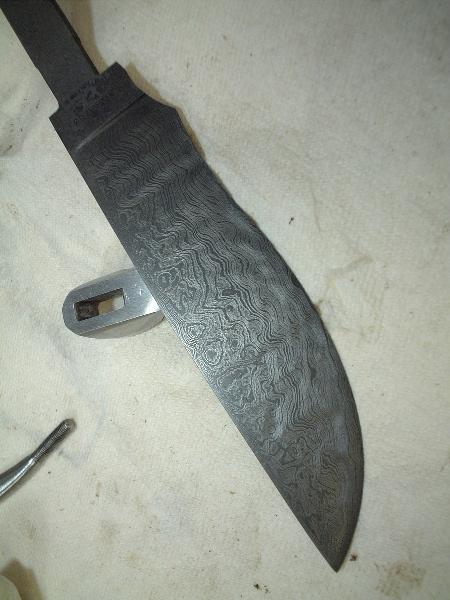
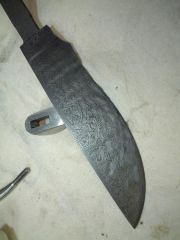
Well, fellas, here's my first Damascus blade etched. This ended up being 405 layers of 1084/15N20. I got a fantastic amount of chatoyance. (3-D) For those of you who may not be entirely familiar with forging Damascus, the 3-D effect going on there is the result of the hammer blows from the power hammer and the hand held hammers distorting the layers while forging, as well as the grinding between stacking and re-welding. Since you have to grind of the scale after each welding cycle, and the layers keep getting thinner and thinner, you actually end up grinding through the top layers of the billet. As well, while forging the blade, I went berserk on the bar of steel with a ball piene hammer before finishng out the blade. The blade is actually perfectly smooth.
Recommended Comments
Join the conversation
You can post now and register later. If you have an account, sign in now to post with your account.