

Skip to content
View in the app

A better way to browse. Learn more.

I Forge Iron

A full-screen app on your home screen with push notifications, badges and more.

To install this app on iOS and iPadOS
  1. Tap the Share icon in Safari
  2. Scroll the menu and tap Add to Home Screen.
  3. Tap Add in the top-right corner.
To install this app on Android
  1. Tap the 3-dot menu (⋮) in the top-right corner of the browser.
  2. Tap Add to Home screen or Install app.
  3. Confirm by tapping Install.

Dad's

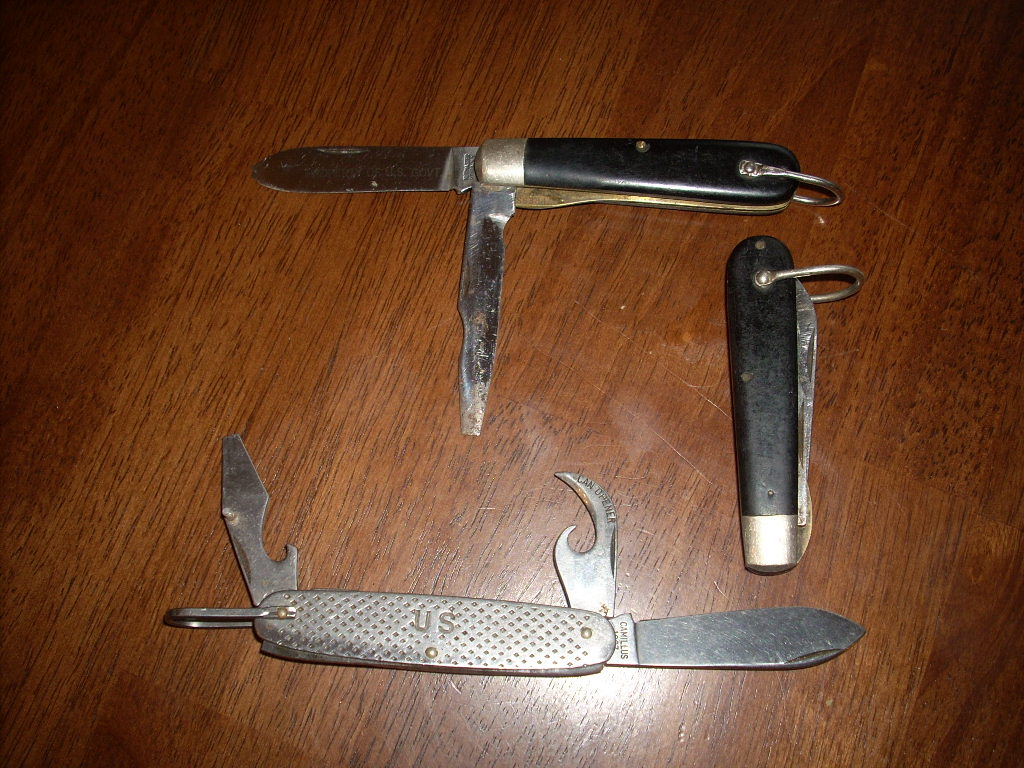
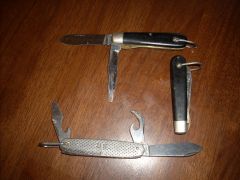
Vets should recognize these. The two black scaled ones are TL-29s, or electricians tool. The other one is a standard Marine issue pocket knife. These are essentially the same as a Boy Scout pocket knife. Just different scales. Older ones had USMC stamped on them. As other branches adopted their use, the later ones such as the one pictured just had U S. That one and the closed TL-29 are Camillus. The open TL-29 was made by Kutmaster of Utica NY.

  • From the category:

    Member Galleries

    · 11,262 images

    Account

    Navigation

    Search

    Search

    Configure browser push notifications

    Chrome (Android)
    1. Tap the lock icon next to the address bar.
    2. Tap Permissions → Notifications.
    3. Adjust your preference.
    Chrome (Desktop)
    1. Click the padlock icon in the address bar.
    2. Select Site settings.
    3. Find Notifications and adjust your preference.