

Whatzit

By Dodge
- 3,326 views
- View Dodge's images
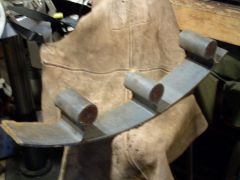
This is one of 5 or 6 other pieces that was scrap from an experimental base plate. The project, cut on a gas flame CNC machine, started with a round plate about 8 feet in diameter and 4" thick. The goal was to cut bolt holes close to the edge without starting and stopping on each hole which, before the torch could pierce, required a preheat of a about a minute and a half or more for each hole. The "slug" was cut in one piece but had to be cut down to the size shown here. This extra handling canceled any time savings from not piercing individual holes
Recommended Comments
Join the conversation
You can post now and register later. If you have an account, sign in now to post with your account.