Latest tinkering

By Mike Ameling
- 3,468 views
- View Mike Ameling's images
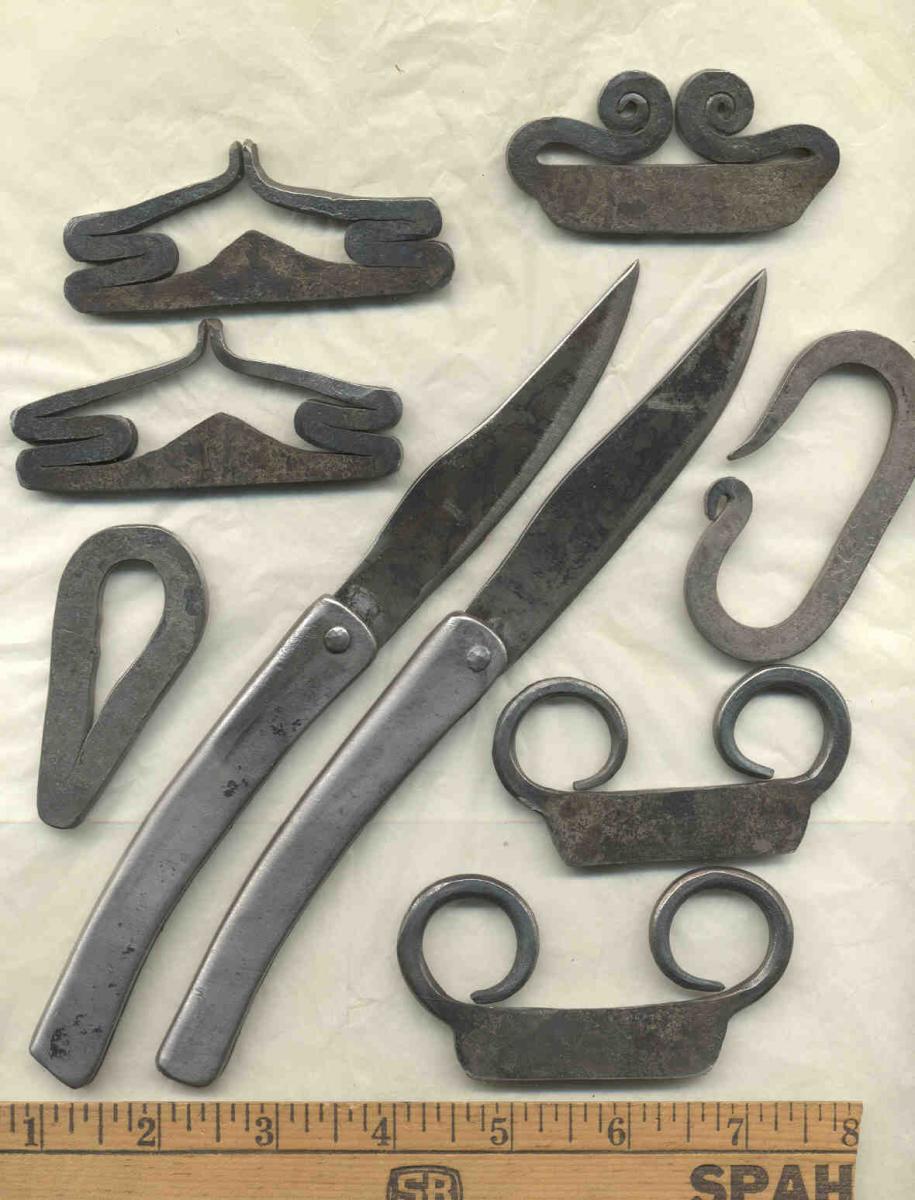
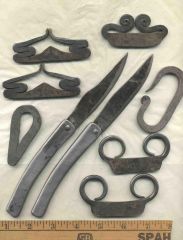
Here's what I was tinkering on today and yesterday. Clockwise from top left: a pair of 1st to 3rd century Roman flint strikers, a 1700's English striker, a classic early 1800's C striker, two mid 1600's French strikers, and an early to mid 1800's HBC style striker called a Voyageur striker. The two knives are based on originals from a 1685 French shipwreck off the coast of Corpus Christi Texas. They were made as cheap folding knives to trade to the Indians. The handles are cold bent out of 14 gauge sheet. The originals had handles about half as thick - like coffee can material! I made up a handle that thin, but just couldn't bring myself to put a blade in it. These with the 14 gauge handles have a nice "feel" to them. Just three pieces - blade, U-shaped handle, and rivet pin. Just some of the historical ... trinkets ... I've been tinkering around with the last two days.
Recommended Comments
Join the conversation
You can post now and register later. If you have an account, sign in now to post with your account.