






Skip to content
View in the app

A better way to browse. Learn more.

I Forge Iron

A full-screen app on your home screen with push notifications, badges and more.

To install this app on iOS and iPadOS
  1. Tap the Share icon in Safari
  2. Scroll the menu and tap Add to Home Screen.
  3. Tap Add in the top-right corner.
To install this app on Android
  1. Tap the 3-dot menu (⋮) in the top-right corner of the browser.
  2. Tap Add to Home screen or Install app.
  3. Confirm by tapping Install.

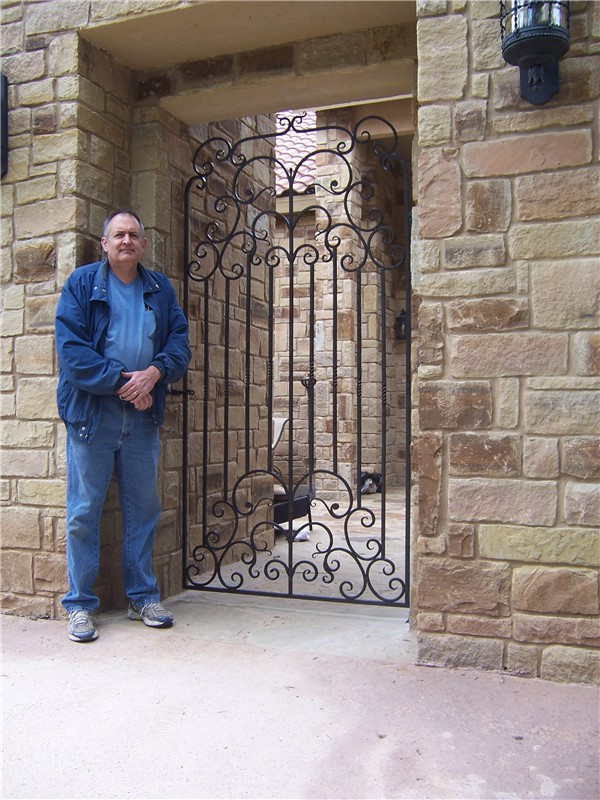
Courtyard gate

My latest: The opening is 97x49; gate came out slightly smaller so it would swing. The homeowners wanted an "old world" look, so this is what we agreed on. All scrolls are forged but I did MIG it together and ground the welds smooth prior to paint. Scrolls started life as 1/2" square, pickets are 5/8" and frame is 3/4" - all solid stock. A fun job and located in a very high traffic area so lots of folks will see it.

  • From the category:

    Member Galleries

    · 11,262 images

    Account

    Navigation

    Search

    Search

    Configure browser push notifications

    Chrome (Android)
    1. Tap the lock icon next to the address bar.
    2. Tap Permissions → Notifications.
    3. Adjust your preference.
    Chrome (Desktop)
    1. Click the padlock icon in the address bar.
    2. Select Site settings.
    3. Find Notifications and adjust your preference.