

Glass Bracket

By MooseRidge
- 2,428 views
- View MooseRidge's images
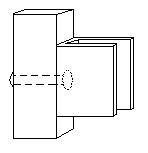
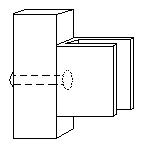
One of the methods I've been working on for holding glass in metal frames is a form of bracket. It's a simple "U" of steel riveted through the center to the outside frame. The walls of the "U" are dependent on the weight of the glass to secure (12ga or 16ga usually) and can be bent cold. A thin slice of close-cell foam protects the glass. I would bend the back tab using a torch (to prevent strain) to a 90 degree angle and the front tab to a 45-60 degree angle. Insert the foam and the glass, then bend the front tab to secure.
Recommended Comments
Join the conversation
You can post now and register later. If you have an account, sign in now to post with your account.