

Skip to content
View in the app

A better way to browse. Learn more.

I Forge Iron

A full-screen app on your home screen with push notifications, badges and more.

To install this app on iOS and iPadOS
  1. Tap the Share icon in Safari
  2. Scroll the menu and tap Add to Home Screen.
  3. Tap Add in the top-right corner.
To install this app on Android
  1. Tap the 3-dot menu (⋮) in the top-right corner of the browser.
  2. Tap Add to Home screen or Install app.
  3. Confirm by tapping Install.

Problem solving

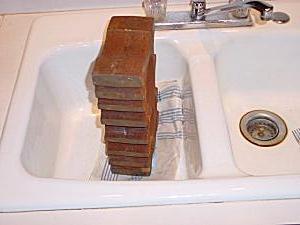
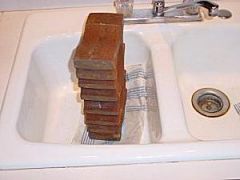
Here is a photo of a Saltfork Swage Block being used to assist the installation of a new garbage disposer in our sink. According to the disposer instructions: "You may wish to place a weighted object in the sink to hold the sink flange in place." Note the use of a towel to prevent scratching of the sink and thus avoiding further instructions. The swage block worked fine for this application. It held the sink flange in place while I installed the gasket, backup ring, snap ring, etc. from below the sink. Jim C.

  • From the category:

    Member Galleries

    · 11,262 images

    Account

    Navigation

    Search

    Search

    Configure browser push notifications

    Chrome (Android)
    1. Tap the lock icon next to the address bar.
    2. Tap Permissions → Notifications.
    3. Adjust your preference.
    Chrome (Desktop)
    1. Click the padlock icon in the address bar.
    2. Select Site settings.
    3. Find Notifications and adjust your preference.