Skip to content
View in the app

A better way to browse. Learn more.

I Forge Iron

A full-screen app on your home screen with push notifications, badges and more.

To install this app on iOS and iPadOS
  1. Tap the Share icon in Safari
  2. Scroll the menu and tap Add to Home Screen.
  3. Tap Add in the top-right corner.
To install this app on Android
  1. Tap the 3-dot menu (⋮) in the top-right corner of the browser.
  2. Tap Add to Home screen or Install app.
  3. Confirm by tapping Install.

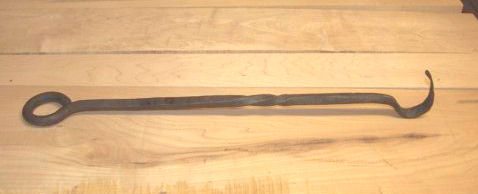
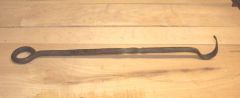
fire rake - first project

You start off with a 24" piece of 5/8" round stock, hammer the entire length into a 1/2" square stock, hammer 6 inches of the end round again, and form the eye handle on the horn of the anvil, then flatten out another 6 inches on the end, and form the shepherd's hook...of course cleaning up (or in my case trying to clean up) some of the transitions between square/round/flat stock. The idea is to get as close to 24" for the completed project, and I shamefully admit I was 2 inches short...22".

  • From the category:

    Member Galleries

    · 11,262 images

    Account

    Navigation

    Search

    Search

    Configure browser push notifications

    Chrome (Android)
    1. Tap the lock icon next to the address bar.
    2. Tap Permissions → Notifications.
    3. Adjust your preference.
    Chrome (Desktop)
    1. Click the padlock icon in the address bar.
    2. Select Site settings.
    3. Find Notifications and adjust your preference.